As I mentioned in my post, we’ve got guest authors on the blog this weekend! Here’s a post by Ava and Amelia. I know they’d LOVE to hear your thoughts on their work! 🙂


As I mentioned in my post, we’ve got guest authors on the blog this weekend! Here’s a post by Ava and Amelia. I know they’d LOVE to hear your thoughts on their work! 🙂
As I mentioned in my post, we’ve got guest authors on the blog this weekend! Here’s a post by Kylie and Lauren. I know they’d LOVE to hear your thoughts on their work! 🙂
As I mentioned in my post, we’ve got guest authors on the blog this weekend! Here’s a post by Ella Marie and Sara. I know they’d LOVE to hear your thoughts on their work! 🙂

Ok, so let me start like this: I always have a plan. I know the things we need to work on, the way I want us to do that (and probably the ways I don’t!), and it’s “penciled in” for everyday. But the great part about that plan is that it is flexible. There is ALWAYS another option if we (the kids or me!) see that we need to go another way. A better way, perhaps. This is just what happened on Friday. I can’t WAIT to tell you about it. 🙂 Friday morning’s recess was great–it was the first time in WEEKS that the temperature had gotten over freezing–and we took full advantage of the sunny playground. I won’t tell you the whole story here, but in short, Millie and Makayla found a collection of things while we were outside that I thought was “blog-worthy” enough to tell you all about. “But why should I tell their story?” I thought to myself, and at that moment decided they could be guest authors on our blog (and that that would become our plan when we came inside from recess). “But shouldn’t everyone have a chance to do that?” I thought next. That’s when the light-bulb moment happened. As soon as we got in from recess we sat down to do something we’ve done many times before: create our chart that we’d use for our Class Meeting later in the day. What they didn’t know (until I told them next), was that we’d be doing something else very cool with it BEFORE our actual class meeting. Here’s what the list looked like after we brainstormed a bit: 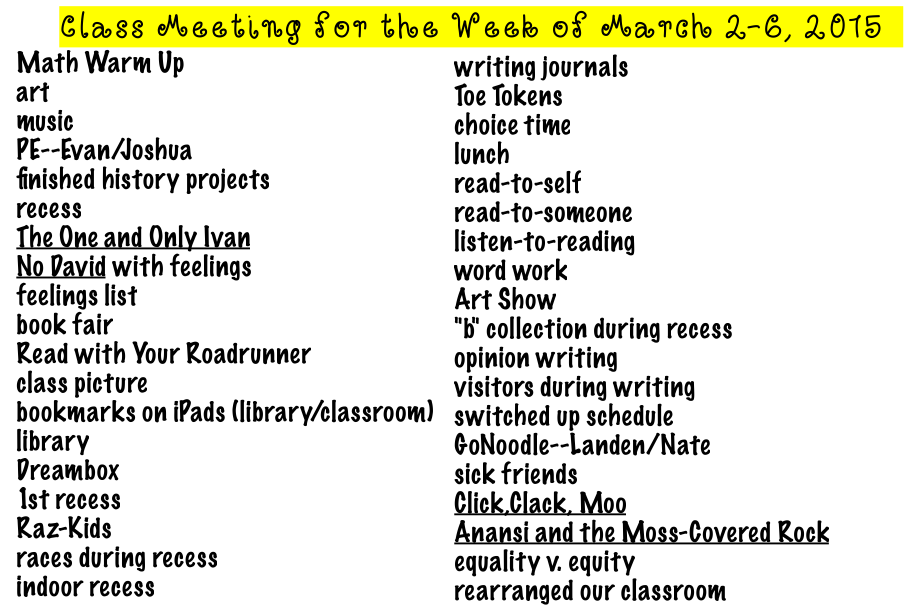 Once I explained the idea, it wasn’t long before kiddos had paired up and chosen their topics. But we weren’t ready yet. The next conversation was about how writing on my blog would be different than writing on their Kid Blogs. The first difference was audience. They figured out that rather than kids being the main readers, parents, principals (including our own beloved Mrs. Sisul!), teachers, authors, librarians and other adults (many that we don’t even know!) are the main readers of this blog. We discussed how that would mean we’d need to “up” our game to make the posts ready for 20somethingkids. Kylie was quick to add in that when I blog I use lots of pictures, and that my posts usually tell the “why” of the story–so that teachers can use our ideas with their own students. We agreed that we should probably use that same kind of thinking in our guest posts. At this point I just had to sit back and appreciate the amazingness of Rm. 202 kiddos. I smile when I listen to their wheels turn and their ideas flow; when I get out of the way, they make some pretty fabulous things happen on their own! Ok, so after our purpose and audience was set, and we had decided on our platform (which would be Notability since they all knew how to use it and I could easily copy it into WordPress), I set them loose. And left them alone. And watched them dig in and work hard and “buzz” with that sound that happens when kids are engaged and learning. They had a real purpose, a global audience of real people to write for, and lots of great learning from the week to share about. I got out of the way and let them be amazing.

Ella Marie and Sara discuss what they will tell blog readers about our history projects from this week.

Emily and Jacob draft their post about our class picture from earlier in the day.

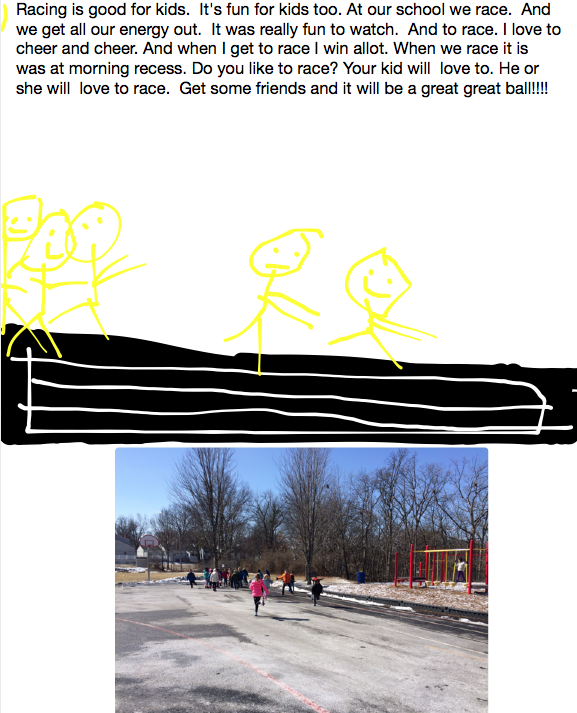
Kylie and Lauren chose to write about the races kids have starting running at our morning recess.
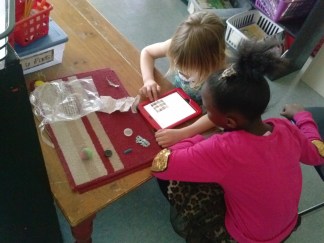
Makayla and Millie (who’s work at recess sparked the whole idea in the first place!) write about a really cool collection of “B” things they found outside on the playground.

Peyton, C.J. and Thomas work hard to explain how we use writing journals in our room every day. They are EXPERTS at putting great ideas in their journals and were perfect for this topic. 🙂

Evan and Joshua chose to tell blog readers about PE and why they like it.

Ava and Amelia wrote about how we use Dreambox to learn as mathematicians every day!
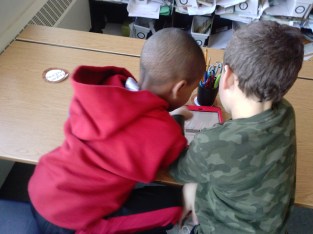
Landen and Nate knew right away they wanted to explain our math warm-ups!
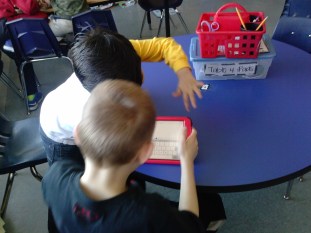
Charlie and Diego worked to tell about our current chapter book The One and Only Ivan (we are LOVING it, by the way!).
I am SO excited to share their work with you! Rm. 202 kiddos–I’m SO PROUD OF YOU!!! 🙂
On of my favorite finds in recent years is Mystery Skype. I’ve tried it with several classes in several states, and even did a Mystery Skype with my friend Ms. Turken while she was teaching overseas in Ecuador!
As I have written about previously this year, there are many things I have brought from 5th grade with me that I’ve been excited to try with my firsties, and Mystery Skype is one I finally pulled out of the bag this week (mainly because of an invitation from a friend on Twitter to schedule one soon!).
The idea of Mystery Skype is really simple (try to figure out where the other class is located by asking yes/no questions), but it can take some time and practice to get good at it. I knew I needed to practice with my kiddos before our first “real” MS, so I called on my friend Ms. Turken for help again. She was totally game.
I asked her to help us by letting us Skype with her class, and at first I was just going to work out the kinks of having kids come up to the camera, making sure we talked loud enough, etc. Then I thought it could be cool to try to actually do a Mystery Skype…INSIDE of our school! So I asked Ms. Turken to take her kids to a secret place in our building and we would try to figure out where they were located by asking good questions!
Before they called us, we spent some time working out the logistics of how you would even begin to narrow down someone’s location in this big, wide world of ours. Using Google Maps and a map of our school, we had some up-front teaching about continents, countries, states, cities and how to narrow down a location by eliminating the possibilities. We talked about directions and how just asking north, south, east, west can cut out a HUGE part of the world that they are considering. We also talked about landmarks (both natural and man-made), and how these can be helpful in determining a location, as well. When we looked at our Robinson maps, we connected these ideas to the floor our friends might be on, as well as our school “landmarks” they might be near, like the gym, cafeteria, library, elevator or bathrooms. They caught on really quickly, and were excited to get started!
Our friends called us and kiddos got busy! Rm. 202 kids were paired up with a friend, and they worked together to study the map, consider the clues they got from our friends’ answers, and then decide on our next question. Pairs took turns coming up to the computer to ask their question and get the answer.


Our questions went like this:
1. Are you in the basement?–NO
2. Are you on the first floor?–NO
3. Are you on the 2nd floor?–YES (at this point they all knew they could just focus on the sheet that had the 2nd floor on it!)
4. Are you in the NORTH part of the building?–NO (this is the end where we are)
5. Are you in the EAST part of the building?–YES (this part had 5 classrooms in it, so again we narrowed our focus!)
6. Are you near MRS. FRY’S CLASSROOM?–YES
7. Are you in MRS. HONG’S CLASSROOM?–NO (she is next door to Mrs. Fry)
8. Are you in MRS. FRY’S CLASSROOM?–YES!!! YAY!! WE FOUND THEM!!
After a bit of cheering and a few high-fives, we debriefed on how the experience went, as well as what we’d do for the “real” Mystery Skype session in a few weeks. We used the protocol of “plusses” (things we’d do again) and “deltas” (things we’d change). I’d say they had some pretty great insights!
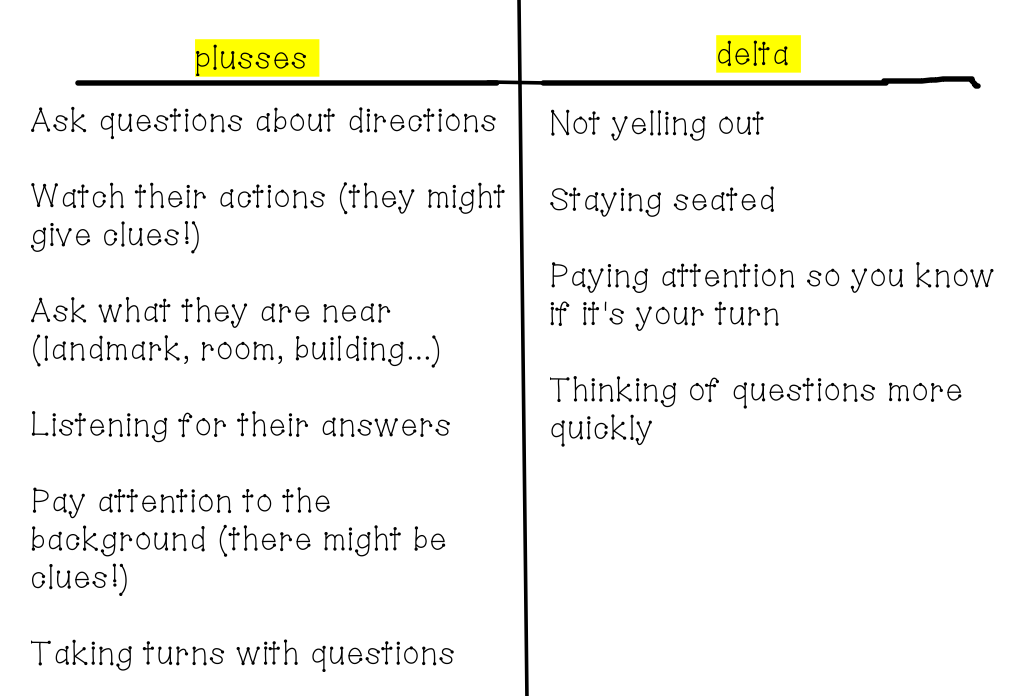 I especially thought the one “watch their actions” was a good idea. It came because of the question we asked about our friends being “near Mrs. Fry’s room.” Millie noticed that Ms. Turkens’ friends were snickering and covering their mouths when they answered, which told her that they were probably IN her room. We agreed that often watching how someone reacts can give clues.
I was beyond impressed with how well both classes of firsties did, and am continually amazed at how well “little” kids do with “big” kid things like blogging, Twitter and Mystery Skype. I’d say it’s proof that you should never underestimate someone because of their size! WAY TO GO, RM. 202 KIDDOS!
Alright….one more time…here are the links to the first four parts of the story. And this one is probably the biggest and best: this part of the story is about how 20 super smart first grade bloggers taught their FIFTH GRADE BUDDIES about how to blog. Yup–you heard me right: the little kids taught the BIG KIDS something. Before I even tell you what happened, I feel like I should start with my some of my kiddos’ words about how it felt. Wait—maybe that will tell the story better than anything else I could say. 🙂
Evan—“It felt spectacular. I felt good teaching a 5th and I’m only a 1st grader. It was hard. He kept on asking me questions and I wasn’t sure how to answer.”
Peyton—”It made me feel happy. It filled up my bucket to be a good teacher to a 5th grader.”
Lauren—“I felt happy because I got to see my buddy and there were words that were popping up that were funny.” (I think this is about the auto-correct feature on their iPads 🙂 ).
Ella Marie—“It felt awesome. I got to make blogs and I like blogs! I saw something new and I told my buddy about it.”
Sara—“I felt happy because we could make a blog together.”
Charlie—“I felt like I was the most important teacher in the world! I like that my buddies are funny!”
Diego—“I felt so happy because usually big kids but usually little kids were the teachers!” (Doesn’t this one just say it all?!)
Kylie—“I felt good because we got to experience new things that I didn’t know about, then I figured out I did know about it.”
Emily—”It felt good because I felt like a teacher and also it felt good to teach a 5th grader!! Little kids usually get taught by bigger ones.” (Again–what an authentic audience!)
Thomas—“I was really excited because it was my first time writing with a 5th grader. It opened up my grit.”
Amelia—“I felt really happy because I didn’t know how to spell a word, and my LB helped me. It filled up my bucket!”
The assessment we used to tell us we did a SUPER JOB of explaining blogs to our buddies? Their questions to their teacher as they left our room: “Dr. Grayson, can we have our own blogs, too?” What more could we ask for?? 🙂
Yep, there were three parts before this one that gave more details of this exciting journey into the blogosphere! (Part 1 Part 2 Part 3)
After we had done days and days of prerequisite work (including teaching our friends in Rm. 203 about how to comment on blogs and having them join us for a day of practice), we were ready to give it a try (plus, we had to be ready for when we’d teach our 5th grade buddies all we knew about blogging–more on that later!). Needless to say, the excitement in the room was CRAZY!!
These pics are from our share session with our neighbors, but they really could show what it looked like as we started our blogs, too. I mean, I guess there’s no real way to show the process of writing a new blog except maybe to share the blogs with you! As you read our new Kid Blogs, imagine the big smiles on our faces as we made them! Being a blogger is SERIOUS BUSINESS when you’re 6! Check it out!
If you haven’t read part 1 and part 2 of our blogging journey yet, you can check them out here and here. 🙂
After we had a chance to try out commenting for ourselves on our friends’ paper blogs, it was time to get down to the REAL business of REAL commenting on REAL blogs with REAL people! This was one of those places where I added in some extra lessons to the version of Blogging 101 I have done with 5th graders. I just felt like my little bloggers needed more opportunities to practice before they graduated to their own blogspace.
With many things we are learning and practicing for the first time, turn-and-talk or partner conversations are a good way to work through concepts with a friend. This allows for each to teach and learn (based on what they know), and also to help ensure that everyone is on the same (or at least a similar) page before we move on to doing things independently.
As we gathered for Writers’ Workshop, I had kiddos sit with their elbow partners and explained that I was going to give them a “blog” to read and that they were then supposed to turn-and-talk with their partner about how they would respond to that “post.” I made sure to write examples that they could relate to, and encouraged them to remember to include what they had learned about how to leave a good comment: respond to the writing, say more to give details or reasons, and to ask a question to keep the conversation going. Together with their partners, everyone had a chance to role-play with at least 5 or 6 of these scenarios:



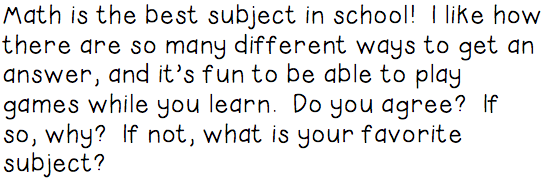

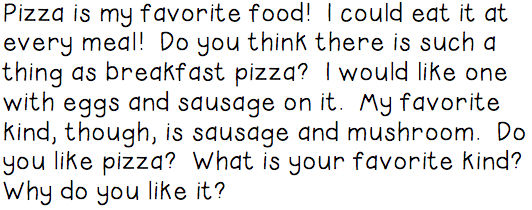




I tried to write posts that seemed real and relevant to first graders (like ones that they might read on others’ blogs and that they would eventually write on their own!), as well as ones that had examples of the parts of a blog post that we would talk about soon after this.
As a check-in to assess how kiddos had been doing, and to give those that might need more support some ideas, we went through each “post” and shared out some examples of responses. Together we “graded” the responses by giving thumbs-up if all of the components were there. Like I said before, this was a new step to my blogging process, but I’m really pleased with how it went and how excited they were about learning it!
The next day I gave them their first go at trying these newly acquired skills on someone else’s blogs. Together with their partner (the same one as the previous day), they read blog posts and commented. This day also add a separated but related lesson of its own: QR codes! Since I knew that this would be a quick and easy way to get websites and other links to my kiddos, but since I also knew they hadn’t heard of them before, I introduced the concept as the way to get to the blogs we would be visiting. Yep, a two-birds-one-stone situation. 🙂 They learned how to use the QR reader, how to find the site they were looking for and then also how to manipulate the interface of KidBlog.org itself (which would soon come into play as they saw their own KidBlog site!).


They had a great time and did a great job practicing their new commenting skills. The downside? The only links I could find to 1st Grade KidBlogs (at the time) were archived ones from classes that were not able to respond to the comments we left. 😦 Oh well, we got to practice on our end anyway, right? 🙂
A few years ago, I was part of an iPad Scout as our school district made decisions about how best to implement a 1:1 initiative. Since then, they decided to go with iPad Minis for everyone (well, except for K this year, who is utilizing the iPad 2s the teachers used to have), and now it’s finally first grade’s turn!!
Since we’re a little ahead in Rm. 202 technologically speaking (partly because of my scout experience), we were the first class to get our Minis! Check out the faces here–they say it all!
 Ok, but I’m getting ahead of myself…there was much work that happened before we could take this picture. Let me explain.
As a member of our district’s Technology Leadership Group, I have the opportunity to learn and grow with other tech-minded friends, and share resources for our tech-learning journey. So as I got started with iPads in 1st grade (which is very different than getting started with them in 5th grade!), I was glad to have help from my friend Jen Bartin, who has had several years of experience with using them well in 2nd grade. She shared her version of iPad Boot Camp, and it was just what we needed.
So before we even THOUGHT about unpacking the box of bright red goodies, we had to talk about the expectations. More than anything else, these little friends of mine need to be on teh same page as me about why we have them, how we will use them and how we will be safe as we do that. The first thing we did, then, was read and discuss the student iPad agreement:
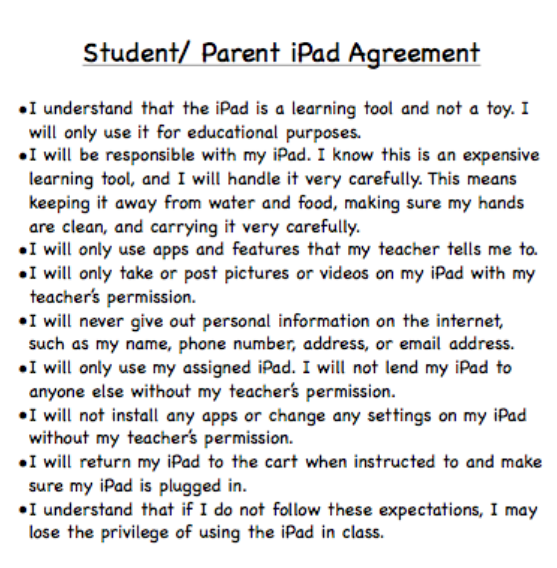 This conversation was a bit long, and probably one of the most boring things we’ve done in a long time, but SUPER IMPORTANT to our work. They seemed to get it, and are dedicated to doing the right thing. That last line seemed to weigh heavily on them. They understand their choices and consequences are related. 🙂
We spent the rest of the day learning some logistical things, like turning the iPad on and off, using the lock button for the screen, creating shortcuts to some important places on the home screen, and turning off the clickety-click sounds the keyboard makes. While it is really important to me not to be solely app-focused, there are some good ones that we will use often, like Raz-Kids, which we have been using already on our class iPads and laptops. This was an easy one to get them going on and is a great way to build our reading skills. We also learned how to use the Kidblog app (which is a little different than the way the website works) to work on a post related to our history study in Social Studies. Dreambox–another app we use regularly–is also our iPads and we checked it out before we had choice time. It’s not usual that we’re all doing the same thing at the same time, but hey, if we want to, now we can!
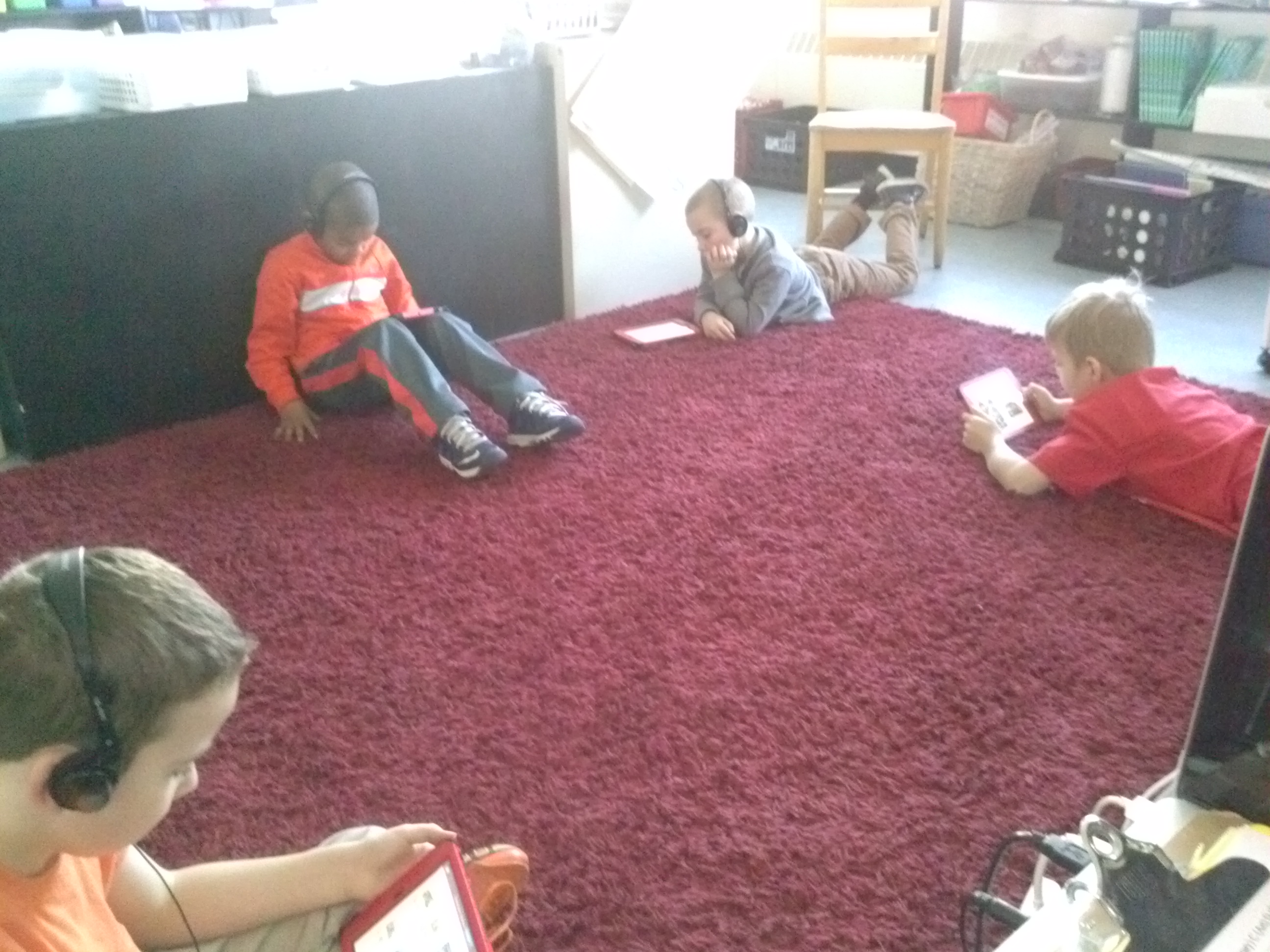
Kids checking out Raz-Kids on Thursday!
Yeah, but we weren’t finished there. The last lesson of the day was how to put these little beauties away and how to charge them so they’re ready to use every morning. We already had the cart (that our laptops used to go in), and just had to figure out how to best organize the iPads inside it. I had seen a post this summer that used a dish drainer to hold devices and thought we’d give it a try. I had one on my table (that I was using for something else), but threw it in the cart to see how it would work. Empty, it looked like this:
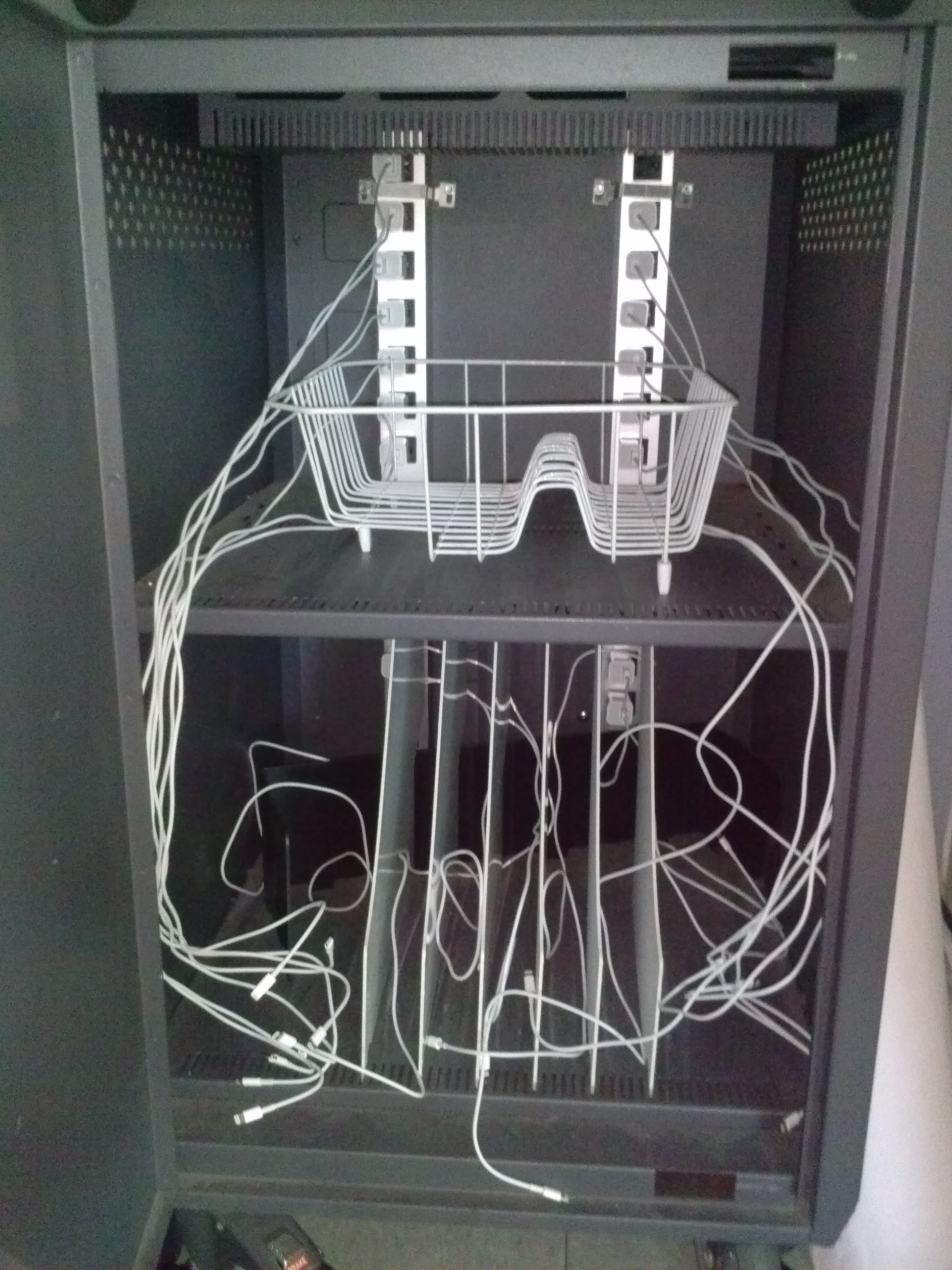 I know it looks like a big jumble, but the idea is that every cord (which are all already labeled for each kiddo) is in order and will be available for kiddos to pull out easily. Right now (until I buy another tray) there are 13 on the top and 7 using the dividers that were already there. It seemed like a great idea.
And then we started putting them away. I took time to carefully and clearly show each kiddo (two or three at a time) which cord was theirs and where their iPad went in the tray. It took about 10-15 minutes to get 20 in there, and it looked like this once we filled it all up:
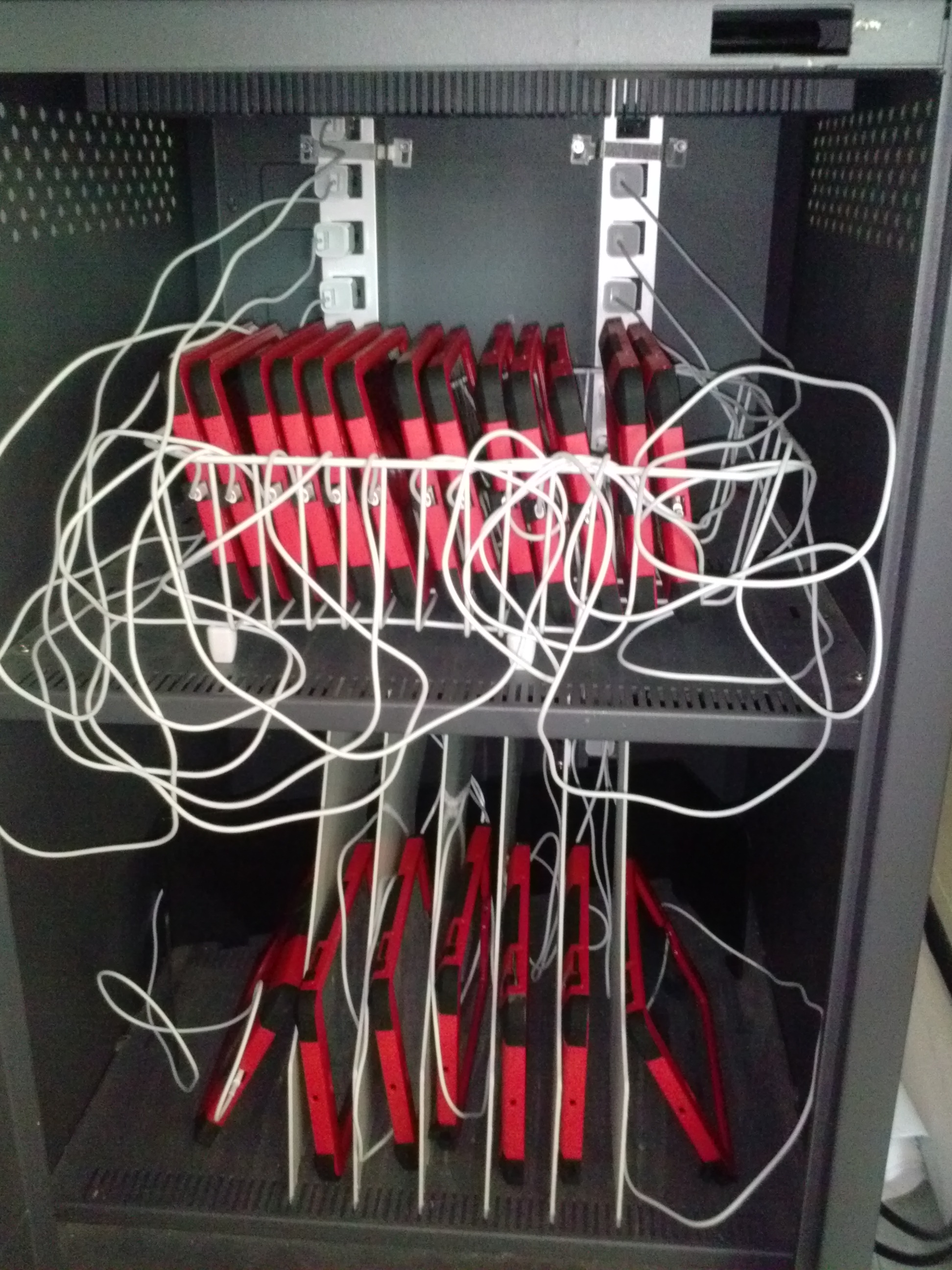 And now I’m not so sure. Now all I see is a big jumble of cords. It seems like unless I stand there every time with every kid, it will ALWAYS be a headache. I’m thinking I’m going to scrap the dish drainer idea and install more of those plastic dividers. Any suggestions, friends who are already doing this? I want to have a system that is both functional and completely kid-sustainable. Like with most everything else we do, I don’t want this to be something an adult has to do for them. I want them to take the lead. Thoughts?? 🙂
UPDATE: After a suggestion from Jen Bartin (remember her smart ideas for iPad Boot Camp?) and a reflection on HOW LONG it took to put them away that first time, I decided to chuck the whole “dish drainer” idea and just use the dividers. And it didn’t actually take as long as I was told to put them in. It works better and boy is pretty! What do you think?
 So much better, no? This picture makes my heart happy for so many reasons! It’s weird, but I think my favorite part is the stickers. Functional and cute:

Rather than labeling with names, I just put numbers that correlate to our class numbers that we use for almost everything else. This system works so. much. better! 🙂
Whew! Our 100th day of school was today! Boy am I tired! WE WERE BUSY!!
I’ve been thinking about how to spend that day (and mainly trying to figure out how to both “celebrate” and still be rigorous and meaningful in my choices), and had landed on several ideas I was pretty excited about. The good news? We were able to use my idea list today. The bad news (well, just the other news I guess…)? We just did one of those things. Let me explain. 🙂
If you were writing down a list of what we accomplished today, it would just say “blogging.” I even had a kiddo say, “All we did was blog today, Mrs. Bearden.” What? That’s ALL we did? In a word, yes, but MAN was there a TON of learning and thinking involved in that day of blogging! I am SUPER AMAZED at what we were able to do today.
I started the day by telling my friends that I had prepared several challenges for them to do and that we could spend the day with those things. We usually start our day with writing, so I shared the writing challenge first, with plans to share the rest of the challenges as we went on through the day. The first thing we planned to work on was a blogging challenge.
With it being the 100th day of school, and the fact that we just went live with our blogs yesterday, I knew they’d appreciate a challenge around the “bigness” of 100 things on their blog. I suggested we try to write 100 blog posts or comments. Or they could challenge themselves to write a post using 100 words (which would be a HUGE STRETCH from the 2-3 sentence posts we’ve written so far). As I had hoped and expected, they were SUPER excited to get started, and were totally up to the challenge!
Our next step was to figure out how we could make it happen. This was a great conversation filled with much mathematical knowledge of groups of 10, counting on by 10s (as I told them we had 17 posts right then and wondered how many there would be if we added 100 more today), and splitting 10s into 5s to figure out new groups (someone said they knew that if it took 10 10s to make 100, it would take 20 5s since 5+5=10). We divided (without knowing it) 100 by the 20 people in the room (including me!), and as we went through the challenge we did lots of adding and subtracting to figure how many more we needed and how many we had at any given point.
We got started, and you know what? I don’t have many pictures of the work we did. I was as busy as they were, answering questions, moderating posts and comments and helping everyone as needed. So with 20 people, 12 iPads and 5 MacBooks between us, we were able to complete 100 BLOG POSTS AND COMMENTS today!! YIPPEE!! It took us almost all day, but we did it! And when we were finished, we had this to say:
(Hopefully you can tell they’re saying, “I00 BLOGS ROCK!!”
Now, I go back to that part about “all we did was blog all day,” because even though I didn’t mean to, at one point I even questioned whether I had done enough with the day. We didn’t have a big long list of activities to show for our time together. No one took home anything different than a normal day. We didn’t have any thing to prove we worked hard and stretched our thinking today. We did, however, have this:

It’s a little hard to see, but these are the charts where we kept tally of all of the posts/comments we finished. We counted them by 10s, 1s, and 2s at several points during the day as we figured out what we’d done and how much we had to go. It hangs outside our room for others to see. I’m hoping it will elicit questions for my kids (and for me) about how we spend our100th day! We have a great story to tell!


(ok, we did have a few pictures of the day!)
We also have a Kidblog dashboard that looks like this:
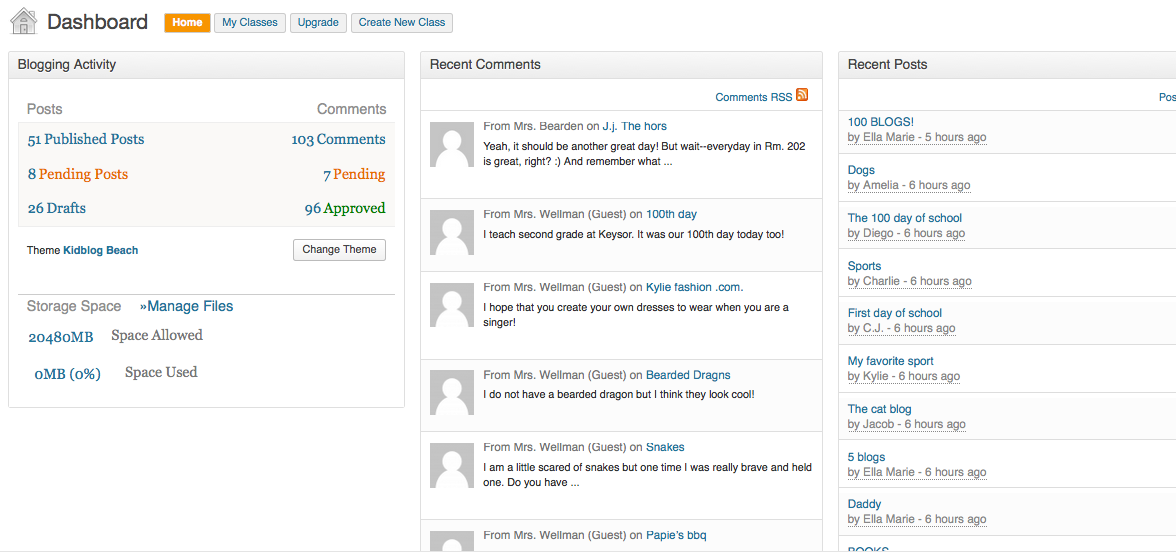
Yesterday we had 17 posts and 0 comments! Check out those numbers as of tonight! We have only been on our blogs since yesterday morning–crazy, right? We’re rocking and rolling already!!
And perhaps even better, we have memories. We have encouragement that came from our friends–“We can do this!”–when we wanted to give up. We have full buckets from the words our friends wrote about our stories. We have new knowledge about how to work the iPads and laptops on our own. We have that feeling that comes with accomplishing a goal. We have successful problem solving that happens when we’re allowed to figure things out for ourselves or talk with our classmates. We have practice with creating meaningful writing for a REAL audience; we worked hard to make our words look right, sound right and make sense. We have practice with letters, sounds and words and we have momentum to go forward with our writing. AND we have a great list of things that we didn’t finish today that we’ll use to continue our learning tomorrow! hee hee
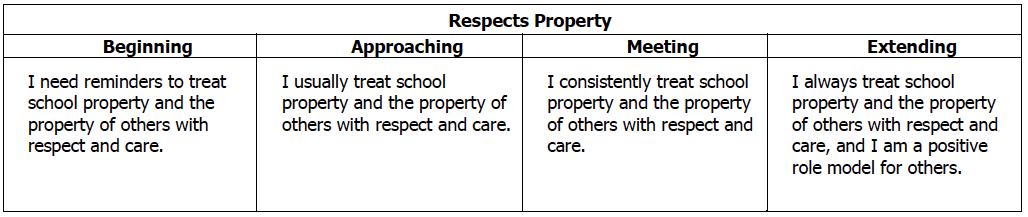
So as I reflected, I thought it would be a great visual (for me at least) to look at our district’s rubrics and match up how today’s work addressed the expectations therein. Check out how many ways this simple blogging challenge touched our 1st grade standards:
Reading
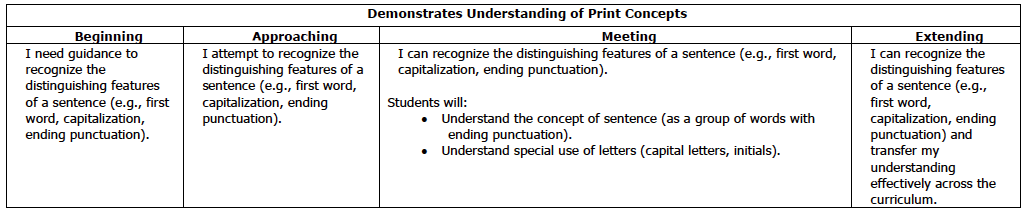


Writing




Speaking and Listening

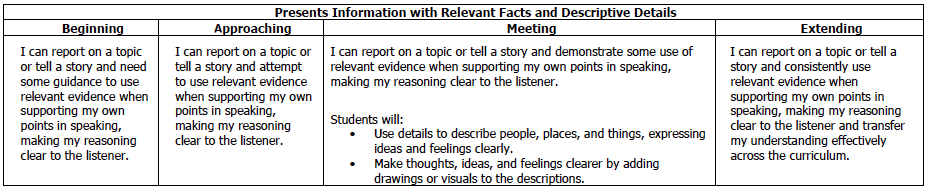
Learning Behaviors and Study Skills
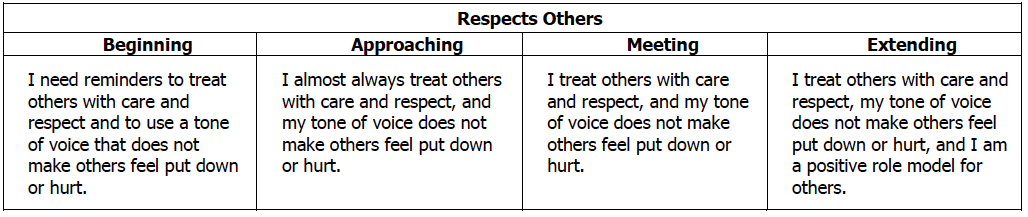


 So needless to say I am tired tonight! I’m pretty sure my kids are, too! The amount of grit they had to use to make today happen and accomplish the HUGE goal set before them was great. And while I know that I am a little biased, I’d say that today was definitely a day we can say we worked to get a little closer to helping Rm. 202 kids meet this mission of Robinson School:
 What did you do for your 100th day? What have you heard from Rm. 202 kids about their day? Please share your thoughts with us! We’re learning how blogging is all about the conversation, and we’d love to start a conversation with YOU! 🙂
 20somethingkids and 1kookyteacher